Broadcast your match
Anyone can watch it live on this site, drawn from the game's own replay as it is written. Nothing to install: this page does the sending.
Broadcasting needs your PC
It runs in Chrome or Edge on the PC you play on, where the game keeps its replays.
Watch live matches insteadThis browser cannot do it
Open this page in Chrome or Edge on the PC you play on. They are the browsers that let a page read a folder you choose.
1 Choose the game's Profiles folder
The page reads the replay the game writes there, and nothing else. In the window that opens, paste this into the address bar:
%USERPROFILE%\AppData\LocalLow\Mana Games\Tennis Elbow 4\Profiles2 Check the game's settings
Two settings decide whether a match can be drawn as it is played, both in the game's Recordings settings: Recordings: Real-Time and Record Debug Info: On (and Auto-delete off keeps your matches to upload later). Your newest replay shows how they were set, once you choose the folder.
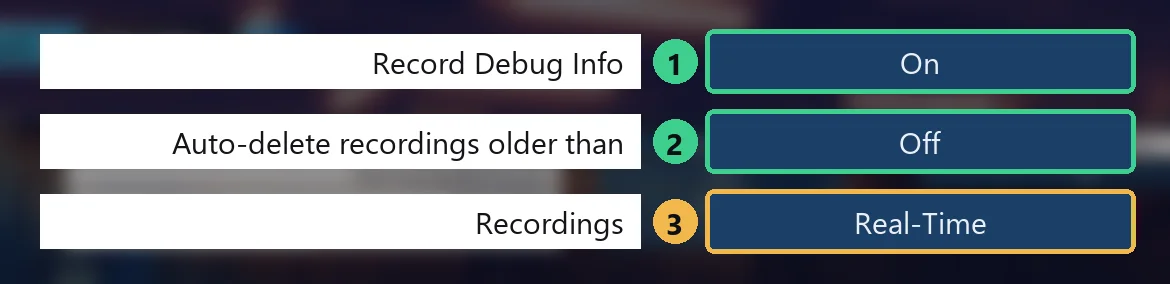
- Record Debug Info: On. Saves the ball's and both players' positions: without it there is nothing to measure.
- Auto-delete recordings: Off. Keeps your older matches, so they are still there to upload.
- Recordings: Real-Time. Only for going live: writes the match as it is played.
3 Play
Keep this tab open while you play. It can sit behind the game.
Your broadcasts
Each is kept 14 days. Save replay gives you the replay file exactly as it was sent, should the game not have kept its own.
Live matches · Your broadcasts show both players' names, as the game does.